

Chevrolet Adaptive Cruise Control Explained
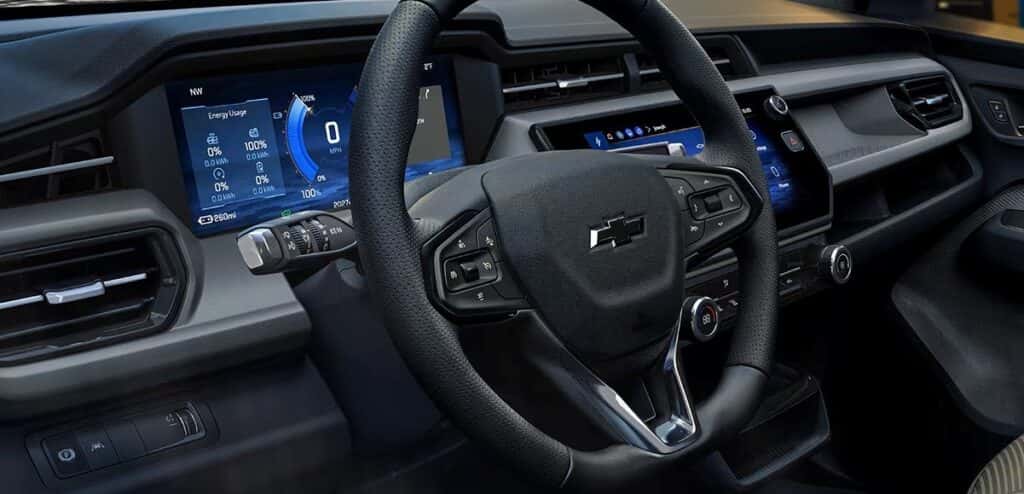
If you drive I-4 or the roads around Orlando, you know speeds can change in a heartbeat. Chevrolet Adaptive Cruise Control (ACC) helps by adjusting your speed to match the traffic ahead. At Don Mealey Chevrolet in Clermont, we field questions about it every week, so we’ve kept this guide plain. If you’re comparing vehicles, you can also browse our new vehicles as you read.
How Chevrolet Adaptive Cruise Control Works
Chevy adaptive cruise control lets you set a cruise speed and automatically follow a detected vehicle ahead at a selected following gap. The following gap is the space the system tries to keep between you and the vehicle in front. With no vehicle in your path, it works like regular cruise control, and you can override it at any time.
Speed, Following Distance, and the Sensors Behind the System
Newer Chevrolet vehicles use a forward-looking camera and, when equipped, radar sensors. The system operates the same with camera-only or camera plus radar sensing. Equipment only changes which sensors need cleaning.
The gap changes with speed rather than sitting at a fixed distance in feet, and it leaves more space at higher speeds.
On most vehicles, ACC can follow a vehicle to a stop, but its braking capability is limited. If the lead vehicle stops suddenly, the system alerts you to brake. After brief stops, ACC may resume when the lead vehicle moves. Check that it’s safe, then press Resume/+ or the accelerator. With a steering-column Driver Attention System, ACC may resume after longer stops if you’re paying attention.
Adaptive Cruise Control vs. Traditional Cruise Control
Traditional cruise control holds one speed and that’s it. ACC also speeds up and slows down on its own to keep your gap. Some models let you switch between ACC and conventional cruise by pressing and holding Cancel until the cluster icon changes. Your owner’s manual will tell you whether yours does.
Adaptive Cruise Control vs. Super Cruise: Not the Same Technology
People often ask what Super Cruise is and whether it’s the same thing. It isn’t, but the relationship matters more than the difference: Super Cruise is built on top of Adaptive Cruise Control and won’t engage without it. You set your speed with ACC first, and Super Cruise layers steering on top when the road supports it.
That layering happens automatically. On a Super Cruise vehicle, the system moves between Adaptive Cruise Control, Hands-On Steering Assist, and hands-free Super Cruise depending on the road you’re on, and the driver display tells you which level is active through a white or green icon. Super Cruise relies on GPS sensing, high-precision LiDAR-mapped data, and a lane-sensing camera, and it covers more than 600,000 miles of compatible roads across the United States and Canada, including both divided and non-divided highways.
Super Cruise still requires an attentive driver, and Chevrolet states plainly that it is not self-driving or autonomous. The system tells you when it wants you back: approaching intersections, railroad crossings, pedestrian crossings, stoplights, and stop signs all trigger an alert to take control. If a driver doesn’t respond to a series of those alerts, the vehicle brings itself to a controlled stop in its lane and contacts an OnStar Emergency-Certified Advisor.
On select 2026 and 2027 Super Cruise vehicles, Hands-On Steering Assist centers the vehicle on most roads with visible lane markings when a hands-free road isn’t available. Hands stay on the wheel for that one.
Which Chevy Models Offer Adaptive Cruise Control?
Here’s the honest answer: you can’t tell from the model name. Adaptive Cruise Control shows up as standard equipment on some trims, as an option on others, and not at all on the entry trim of the same vehicle. We’ll pull the window sticker and go through it with you, and a highway test drive settles the rest. If you’re shopping used, our pre-owned inventory is worth a look, and we can tell you which units have it.
How to Set Speed and Adjust Following Gap in Your Chevy
Customers usually ask how to turn on adaptive cruise control in a Chevy, what the adaptive cruise control switch does, and what the button is called. On a test drive, we sit in the vehicle with you and walk through the steering-wheel controls and the display before you pull out. Controls vary by model, so your owner’s manual is the final word.
Setting, Resuming, Canceling, and Changing Set Speed
To set adaptive cruise control:
- Press the cruise-control On/Off button on the steering wheel. A white ACC icon appears in the cluster or available Head-Up Display.
- At the speed you want, press Set. The icon turns green.
The icon may look like a speedometer with a vehicle above it or an arc with a small triangle, depending on the display.
On some newer vehicles, with the system on, the brake applied and a forward gear selected, you can press Set and use Resume/+ or Set/- to pick a speed while stopped. Releasing the brake does not move the vehicle until you press Resume or the accelerator.
To cancel, tap the brake or press Cancel. The On/Off button works too.
Using Gap Settings (Near, Medium, Far)
Gap adjust is how you change your following gap on Chevy models. The Gap Setting button cycles through Far, Medium, and Near, and the selection shows briefly on the Driver Information Center and available Head-Up Display. That’s also how you adjust adaptive cruise control spacing.
Pick the gap that suits how you drive and the conditions, whether that’s heavy traffic or a wet road. It’s a preference, and you still need to watch traffic the whole time.
Using Adaptive Cruise Control in Central Florida Traffic
ACC is a convenience for stretches where speeds change, and you should keep driving actively. Chevrolet advises matching the gap to traffic and weather, and that’s the general guidance here. Commuters and fleet buyers in the Clermont and Orlando area may especially value it on long daily drives.
I-4 and Orlando Commuting with Changing Speeds
In stop-and-go traffic, ACC adjusts to follow a detected vehicle and, on most vehicles, can follow it to a stop. Braking is limited, so keep monitoring traffic. A longer gap can give you more breathing room when speeds shift.
Merges near the theme park areas call for extra attention. Expect vehicles to cut in and lead vehicles to change without warning. Be ready to brake or steer yourself.
Turnpike, I-75, and Long Trips Across the State
On Florida’s Turnpike, I-75, and other long stretches, set your speed and gap and let the system hold them. ACC adjusts when it detects a vehicle ahead and works like regular cruise otherwise, with the gap growing at higher speeds, which suits highway driving well.
If you’re shopping a Super Cruise vehicle for this kind of trip, one feature is worth knowing about: on properly equipped models, entering a destination in Google Maps shows how many minutes of the drive qualify as hands-free and routes you accordingly. On a run down the Turnpike to South Florida, that’s a meaningful chunk of the trip. Either way you still steer where the system doesn’t, watch the lanes around you, and step in when needed.
What Adaptive Cruise Control Cannot Do: Limits and Safe-Use Tips
The driver stays responsible. ACC does not replace your attention. Watch the road, be ready to brake or steer, and follow your owner’s manual.
- Performance may be reduced by bad weather affecting traction or visibility, obstructed camera or radar sensors, poor lighting, or following vehicles with unusual shapes.
- Sharp curves and merging vehicles may not be handled well, and neither may stationary objects.
- Use the brake rather than rely on ACC for a sudden stop ahead.
Florida Rain, Poor Lighting and Sensor Care
Keep the windshield clean for the forward camera. If your vehicle has radar, keep the front grille and bumpers clean too. The owner’s manual has cleaning instructions. Poor lighting and weather-related visibility can limit the system, so drive manually when conditions make ACC feel unreliable.
Quick tips for Florida:
- Afternoon thunderstorms reduce visibility and traction.
- Bug residue and dirt on the windshield camera area and front sensors can affect the system.
Our service center can inspect sensors, the windshield camera area and glass after a repair or replacement. Calibration may be needed after glass replacement, so confirm that with the Service Center. If you have a sensor or camera concern, schedule service.
Chevrolet Adaptive Cruise Control FAQs
Does it work in stop-and-go traffic? Yes, it adjusts to follow a detected vehicle. Behavior varies by vehicle, so keep watching traffic.
Does it brake to a full stop? On most vehicles it can follow a vehicle to a stop, but braking is limited. If the lead vehicle stops suddenly, it alerts you to brake.
Is it the same as Super Cruise? No. ACC manages speed and following distance. Super Cruise adds steering assistance on compatible roads.
Can I use it while towing? On equipped vehicles, ACC can account for a trailer when it’s electrically connected and the trailering icon appears in the Driver Information Center. If the icon does not appear, do not use ACC while trailering. ACC adjusts acceleration and braking for trailer weight, and Trailer Gain should be set correctly. Do not use it while towing with an aftermarket trailer-brake controller.
What happens in heavy rain? Bad weather can reduce performance by affecting traction or visibility. Drive manually when conditions are poor.
Browse New Chevrolet Models at Don Mealey Chevrolet
Not every example of a model has ACC, so compare the equipment on individual vehicles. Browse our new Chevrolet models or contact us to find vehicles with the driver-assistance features you want.
- We can walk you through the controls, gap settings and driver display in the vehicle you’re considering.
- ACC is one factor alongside your preferred model, trim and driving needs.
Call sales at (352) 432-1391. Hours are Mon–Fri 9:00 AM–8:00 PM, Sat 9:00 AM–7:00 PM, and Sun 12:00 PM–5:00 PM. Visit us at 17185 W Sr-50, Clermont, FL 34711.

0 comment(s) so far on Chevrolet Adaptive Cruise Control Explained