

How to Reset the Chevrolet Oil Life Monitoring System
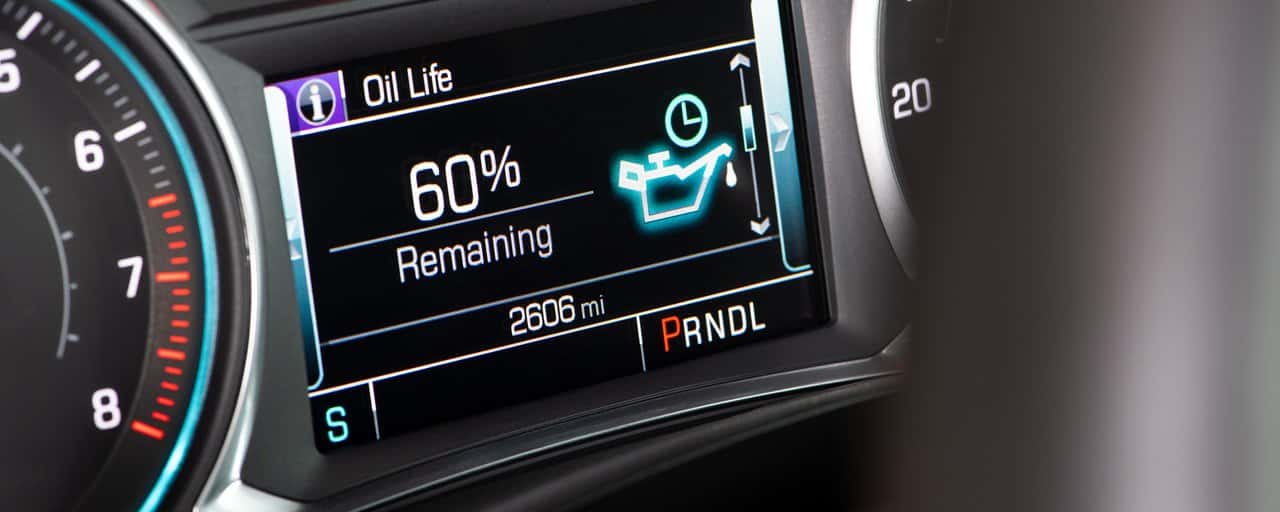
That little wrench icon on your dash, or the “Change Engine Oil Soon” message, means it’s time to pay attention. If you just got an oil change and want to clear it yourself, this guide walks you through how to reset the Chevrolet Oil Life Monitoring System across the 2022-2026 lineup, plus a few older models still common on Clermont roads. If you’d rather skip the steps and let a professional handle it, you can review our Chevrolet oil change services instead.
Understanding the Chevrolet Oil Life Monitoring System
There’s no dipstick reading or floating sensor behind the oil life percentage you see on your dash. The Engine Oil Life System (OLS), developed by General Motors engineering, is a software algorithm installed on more than 20 million GM vehicles. It’s tracking wear, not fluid level, based on idle time, engine revolutions, oil temperature, coolant temperature, ambient temperature, and how you actually drive.
How the System Tracks Engine Oil Condition
The oil life percentage starts at 100% right after a reset and counts down as the algorithm detects stress on the oil. You’ll see the “Change Engine Oil Soon” alert somewhere between 15% and 5%, which typically means you have about 600 miles before service is genuinely due. At 0%, the system displays “Oil Change Required.” At that point, the oil change is due now, not next week.
Why the Percentage Isn’t Just a Mileage Countdown
Two identical Chevys can hit 0% at very different mileages depending on driving conditions. Stop-and-go traffic on Highway 27, short trips around Clermont, and constant idling in Orlando gridlock all wear oil out faster than steady highway commuting. Depending on conditions, oil life can drop as low as a 3,000-mile interval in short-trip, cold-climate driving, or stretch toward the system’s cap under mild, highway-heavy use.
Most GM vehicles from the past decade cap out at 7,500 miles or 12 months, whichever comes first, and GM’s guidance calls for an oil change at least once a year regardless of the displayed percentage. So the honest answer to whether you should go by oil life or mileage is both, with time as the backstop.
When to Reset the Oil Life Light (and When Not To)
The light exists to remind you maintenance is due. Clearing it before that oil change actually happens defeats the whole point.
After a Completed Oil Change
Reset the system only after the oil has actually been changed. The light stays illuminated until you manually clear it, since the system won’t reset on its own. If you skip the reset, the oil life percentage simply keeps counting down from where it was, so the reading no longer reflects your fresh oil. That’s why it’s worth doing the reset right after the change rather than putting it off.
Why Resetting Without an Oil Change Can Hurt Your Engine
Clearing the reminder without actually changing the oil doesn’t make the old oil any fresher. It just hides the warning. Old, degraded oil left in the engine leads to more friction and heat, and eventually real engine wear. It can also complicate warranty claims if GM or a dealer later determines maintenance wasn’t performed as required. If you’re wondering how long you can drive on 0% oil life, the honest answer is that you shouldn’t be driving on it at all. Get the oil changed first, then reset.
How to Reset Oil Life on Chevy Models with a Driver Information Center
Many Chevys built in the last decade or so use a Driver Information Center (DIC) with steering wheel controls. Because button layouts changed over the years, check your owner’s manual to confirm which version applies to your model and year.
Steering Wheel Control Method
For the general DIC approach: with the ignition on, scroll through the DIC menu to “Remaining Oil Life,” then press and hold the thumbwheel or Set/Reset button until a reset prompt appears, and select “Yes.” The display should then show 100%.
On 2014-2018 models with buttons on the right side of the steering wheel or dash, turn the ignition on without starting the engine, press the Set/Reset checkmark button, use the arrows to navigate to “Oil Life Remaining,” and hold the Set/Reset button for about five seconds.
Earlier models with a four-button layout on the left side of the dash use a slightly different path. The buttons are labeled TRIP/FUEL, Vehicle Information, Customization, and Confirm/Reset. Tap “Vehicle Information” to reach the oil life display, then hold Confirm/Reset for roughly five seconds until it clears.
How to Reset Oil Life on Chevy Models with a Touchscreen Display
Newer Chevys, including most 2022-2026 models, rely on the touchscreen infotainment system rather than steering wheel buttons. Generally, you’ll go to the main menu, select “Vehicle Information” or “Vehicle Status,” find the “Maintenance” or “Oil Life” section, and choose the reset option from there. Screen layouts vary slightly by trim and model year, so if you don’t see it immediately, check under a secondary settings menu, or reference your owner’s manual for the exact path on your vehicle.
Resetting Older Chevy Models Without a Digital Display
If you’re driving something like an early-2000s Silverado without a DIC or touchscreen, the reset process looks completely different.
Ignition Key Cycle and Gas Pedal Methods
Turn the key to the accessory position without starting the engine. Within five seconds, press the accelerator pedal fully to the floor three times, spacing the presses out over about three seconds. The oil light should flash and then reset. Pressing the pedal too quickly is the most common reason this fails, so take it slow and deliberate.
This same gas pedal method applies across most older Silverado model years with the older dash layout. Some base trims instead use a trip odometer stalk: turn the stalk to “Remaining Oil Life” and hold it until the reset completes.
Model-Specific Reset Notes for Popular Clermont-Area Chevy Vehicles
Since we see these models constantly in our Clermont service bays, here’s what tends to trip people up on each one.
Chevy Silverado 1500, 2500HD, and 3500HD
Silverados from 2014-2021 generally use the Driver Info Console. For 2019-2021 trucks specifically, turn the ignition on, use the arrows to reach the “i” information icon, toggle to select it, scroll to “Oil Life,” and hold the thumbwheel until you’re prompted “Are you sure you want to reset?” then confirm “Yes.” Silverado oil reset intervals typically fall between 5,000 and 7,500 miles under mixed driving, but towing on Florida’s Turnpike or hauling in Orlando traffic will shorten that window.
One important note for Silverados with the 5.3L or 6.2L V8: both take roughly 8 quarts of dexos®1 Gen 3 (0W-20) full synthetic, which is more than older Silverados held before the EcoTec3 switch, so it’s worth confirming the correct capacity and spec with our team before a DIY change.
Chevy Equinox, Traverse, and Tahoe
On the Equinox, the touchscreen path runs through the main menu to “Vehicle Status” or “Vehicle Info,” then “Maintenance,” then “Oil Life.” The DIC alternative is scrolling to the oil life percentage and holding “OK” or “Enter” until the reset prompt appears. For the Traverse and Tahoe, when serviced through Certified Service, the indicator resets automatically as part of the visit, so manual resets are only needed if the oil was changed elsewhere.
One caveat worth knowing: push-button-start Traverse models sometimes won’t respond to the standard key-cycle method, and oil life may not even show up in the DIC menu on certain trims. If that’s the case, contacting our team directly is usually faster than troubleshooting on your own.
Chevy Malibu and Trax
Base display Malibu and Trax models use the ignition-on method: navigate with the arrows to the VEHICLE tab, hold the checkmark button, then press the up arrow to select “Yes.” For earlier Malibus, hold the INFO and RESET buttons together for about one second, release, then continue holding RESET until the display reads “ACKNOWLEDGED.” The gas pedal method also works on these models: key on, engine off, press the pedal to the floor three times within five seconds.
What to Do If the Oil Change Light Won’t Reset
If you’ve tried the right steps and the light still won’t clear, start by double-checking your press-and-hold timing, since that’s the most common culprit. On older Chevys, a sticky reset button or a wiring issue can also prevent the system from acknowledging the reset. In stubborn cases, a dealer scan tool is often the only reliable way to clear it.
Stop troubleshooting on your own if either of the following happens:
- The oil life light appears alongside another dashboard warning message
- A low oil pressure warning shows up at the same time
Together, those two symptoms usually mean something mechanical is going on, not just a software hiccup, and driving on it risks real engine damage. Reach out to our team and we’ll take a look before it becomes a bigger repair.
Below is a quick reference for the models we see most often in Clermont:
| Model | Reset Method | Typical Oil Change Interval | Recommended Oil |
|---|---|---|---|
| Silverado 1500 | DIC / Steering Wheel | 5,000-7,500 miles | dexos®1 Gen 3 (0W-20) |
| Silverado 2500HD/3500HD | DIC / Steering Wheel | 5,000-7,500 miles | dexos®1 (gas 6.6L) or dexos®D (Duramax diesel) |
| Equinox | Touchscreen or DIC | Up to 7,500 miles or 12 months | dexos® |
| Traverse | Touchscreen (auto-resets via Certified Service) | Up to 7,500 miles or 12 months | dexos® |
| Tahoe | DIC (auto-resets via Certified Service) | 5,000-7,500 miles | dexos® |
| Malibu | Touchscreen / Manual | Up to 7,500 miles or 12 months | dexos® |
| Trax | Manual / Touchscreen | Up to 7,500 miles or 12 months | dexos® |
Trust Don Mealey Chevrolet for Factory-Recommended Oil Service
We understand the temptation to handle this yourself, and for many drivers, resetting the light is genuinely simple. But Florida summer heat speeds up oil breakdown, and the stop-and-go commute between Clermont and Orlando puts extra strain on your engine, so nailing the right interval and oil grade pays off down the road.
What’s Included in a Dealer Oil Change and Reset
Our Certified Service team handles the reset correctly as a standard part of every routine oil change, so you never have to worry about a mismatched percentage that no longer reflects your fresh oil. We also make sure the correct oil grade goes in, which matters given that the Silverado’s 5.3L and 6.2L V8s both take about 8 quarts of dexos®1 Gen 3 full synthetic, a bigger fill than older trucks used. Most oil change visits also include a tire rotation and a multi-point inspection, so you’re covering more ground than just the oil.
Schedule Your Chevrolet Service Appointment in Clermont
If you’d rather leave the reset and the oil selection to people who work on these systems every day, we’re at 17185 State Road 50, Clermont, FL 34711, ready to help. Schedule your oil change online and we’ll take care of the rest.
Frequently Asked Questions About the Chevrolet Oil Life System
Do I need to reset the Chevrolet Oil Life System after every oil change?
Yes. The Chevrolet Oil Life System does not automatically detect fresh oil. Resetting it after the oil change returns the display to 100% and allows the system to accurately track the condition of the new oil.
How do I reset the oil life on a 2022-2026 Chevrolet?
Most 2022-2026 Chevrolet models let you access Oil Life through the Vehicle Information, Vehicle Status, or Maintenance menu. Select the oil life display, choose the reset option, and confirm the prompt. The exact menu path varies by model and trim.
Can I drive my Chevrolet when the oil life reaches 0%?
You should arrange an oil change immediately when the display reaches 0% or shows an Oil Change Required message. Resetting the warning without replacing the oil can hide overdue maintenance and increase the risk of engine wear.
Why won’t my Chevrolet oil life light reset?
The most common causes are using the wrong menu path or not holding the reset control long enough. Older vehicles may also have a sticky button or electrical issue. If the warning appears with a low oil pressure message, stop troubleshooting and have the vehicle inspected.

0 comment(s) so far on How to Reset the Chevrolet Oil Life Monitoring System